Build the app your team wishes it had
Our AI-first custom application development starts with one workflow, like quoting in the field. Your team tests the app alongside its current tools and replaces them only when the new workflow proves itself.
- Start with one workflow
- Connect it in one app
- Replace tools once proven
As you add workflows, the app can grow into a bespoke business operating system for your teams, records and approvals. If you just need to connect tools you already use, see our workflow automation service.
Three kinds of applications we’ve worked on
Compliance operations
An application for a specialist compliance business to bring client intake, records and review into one place. It was designed to help staff work through cases consistently while keeping review decisions with the people responsible for them.
Stage An initial build was made available for review.
Equipment licensing and eligibility
A rules-based tool that turns spreadsheet inputs into checks staff can review. It helps staff work through eligibility consistently and identify results that need a closer look.
Stage Undergoing pilot testing and validation.
Field quoting and office handover
A mobile-friendly quoting app for repair assessors. It supports quoting with patchy reception, lets technicians work on a shared quote and gives the office visibility as quotes move into its job system.
Stage Early release ahead of pilot sign-off.
How we get from idea to release
Eden leads the technical build. Our developers use AI to write and revise the software, a project manager keeps the scope clear, and our tester checks each release. You see working versions and help decide what goes live.
Scope the job
We sit down with the staff who do it, look at the systems they already use and agree what the first release must do. We write down what counts as done and what can wait.
Build in small pieces
Eden and the developers use AI where it helps, review the code and walk you through working versions. Your project manager keeps you across decisions and explains what a scope change means for cost and timing before it goes in.
Keep testing as we build
Our tester runs ordinary cases and the awkward ones: missing data, the wrong user permissions, two people editing the same record or a connection dropping mid-job. We retest fixes and give your team a chance to try the agreed workflow before release. For a field-quoting example, see how to tell whether a demo is ready for your team.
Pilot and hand over
We agree release checks, document how the app works and confirm who owns the code, accounts and support. Where monitoring or a rollback plan is needed, we scope it up front.
What does it cost?
All figures are indicative, in AUD and exclude GST.
First project
A$3,500 to A$8,000
A scoped proof of concept or a focused operational workflow.
Defined build
A$8,000 to A$30,000
A portal, dashboard or multi-step application with integrations.
Broader system
Usually from A$30,000
Broader systems are scoped in phases.
Structured discovery, if needed, is typically A$1,000 to A$5,000. We agree the scope and price before work begins and identify separate costs for hosting, paid third-party services, model usage where applicable and ongoing support. These ranges are planning guides, not prices for the projects above. See How We Work & Pricing.
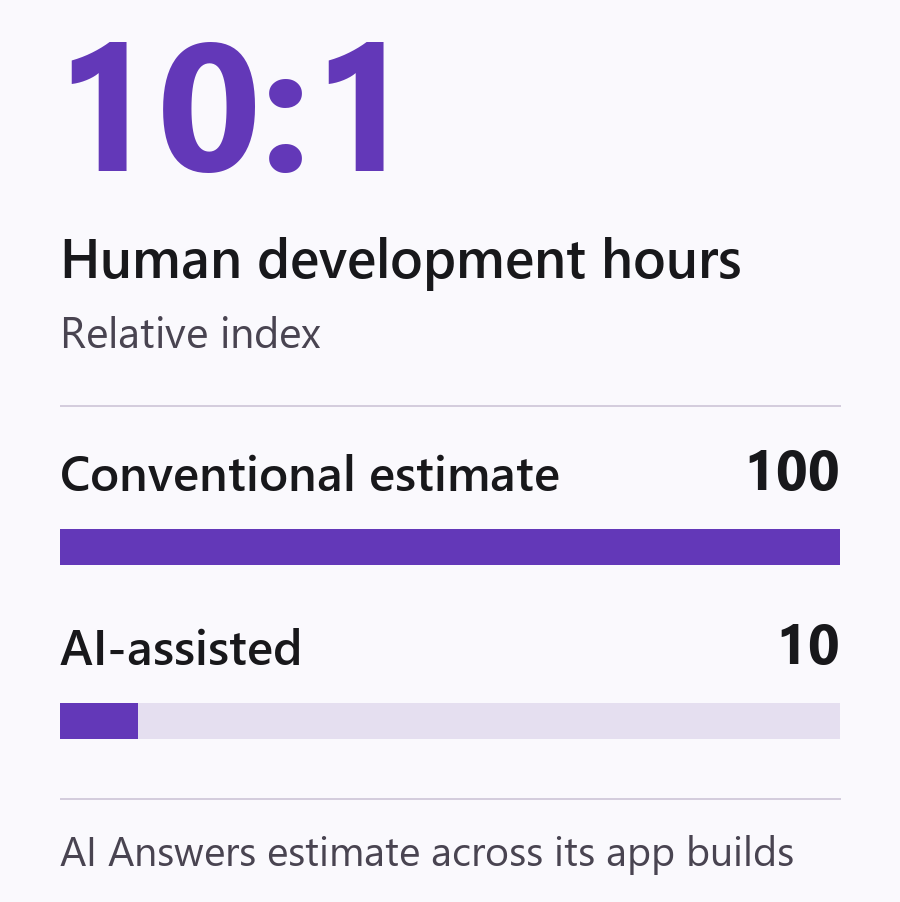
10:1 human development hours: our project estimate
Across the applications we’ve built, we estimate that conventional development would have taken roughly ten hours of human development time for every hour we spent with AI assistance. The conventional baseline is our estimate, not a measured head-to-head comparison or a prediction for your project.
The ratio applies to human development hours. It does not predict the same change in elapsed time or total cost. Scope, testing and deployment affect the delivery date, and hosting and ongoing support add to the cost after launch.
Handover and ongoing support
We agree up front what your IT team will need at handover. We provide the working app, source code and runbook we’ve agreed on. If your team wants an AI coding assistant, we can include one to propose changes. Your IT team reviews and tests those changes before deciding what to deploy.
After go-live, we can manage the app remotely, report on its health, monitor it and alert your team when something needs attention. We scope this support separately and agree in writing what’s covered and how we’ll respond.
What would you build first?
Tell us what your team does by hand today and what happens when it goes wrong. That’s the quickest way to work out what’s worth building.