How to use AI for EOFY tax planning in 2026: 7 practical hacks for Australian SMEs
Find missed deductions, model cash flow, and walk into 30 June with clean numbers — without learning a new piece of software.
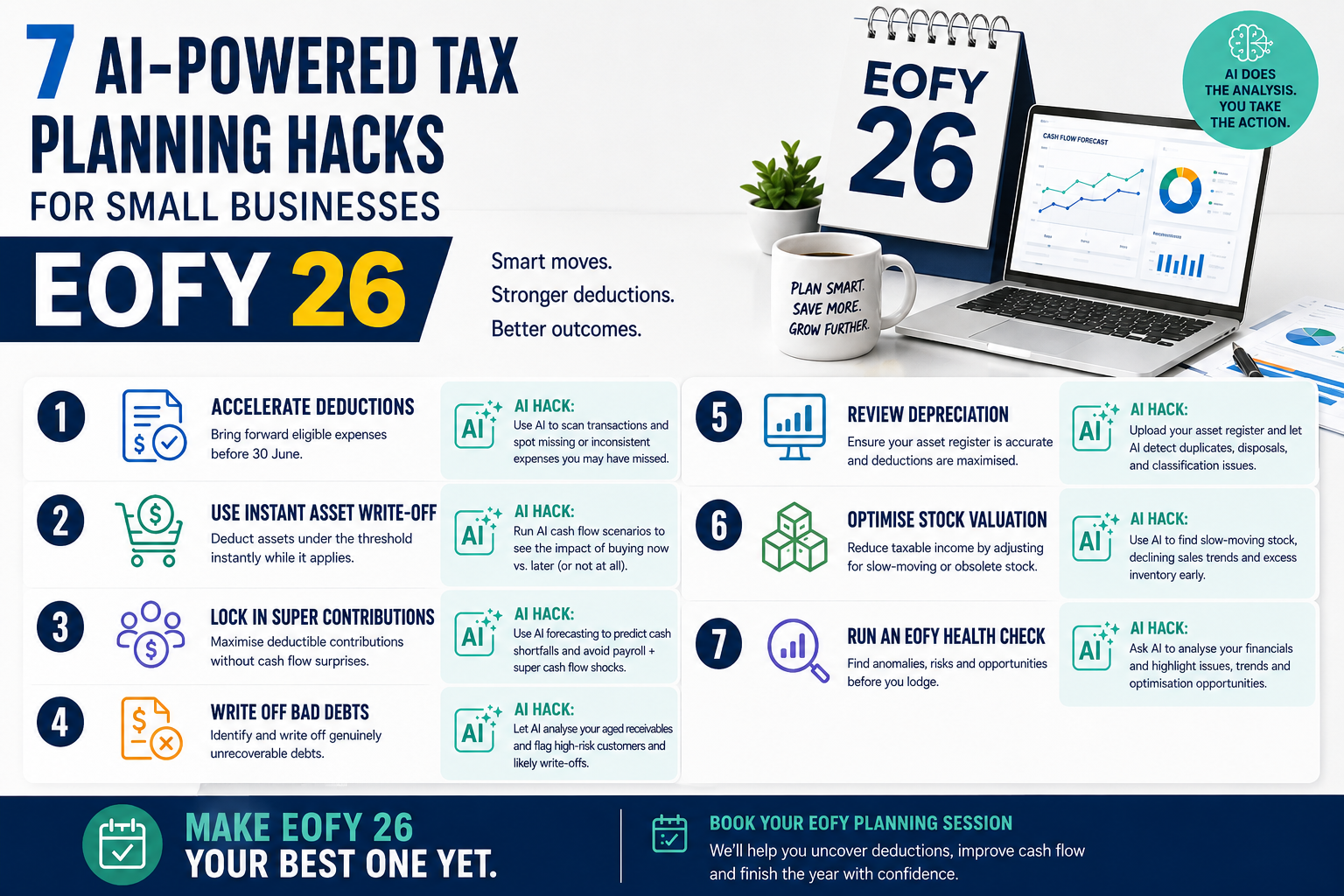
EOFY used to mean spreadsheets, late nights, and last-minute scrambling. In 2026, the SMEs that handle it best are the ones using AI to surface issues early, automate the grunt work, and make confident decisions before 30 June.
This article covers seven practical ways to use AI for EOFY planning. Each one includes a specific prompt or workflow you can run this week — no consultants, no new software, no twelve-week implementation plan.
Before we start: nothing in this article is tax or financial advice. It’s a workflow guide. Run anything you act on past your accountant or registered tax agent first.
Two ways to do this: built-in AI vs general-purpose AI
You can run every workflow below in one of two ways.
Under each hack below I’ve flagged both options, so you can pick the one that fits where you actually are right now.
A quick reminder on what AI is good for. AI gives you better questions, faster pattern-matching, and cleaner analysis. It does not replace your accountant or bookkeeper — and the workflows we build for clients always assume there’s a human signing off at the end. If you want a sense of how that works in practice, our case studies walk through real examples.
Skip the article — book a chat instead
Skip the article — book a chat instead
Book a free chat with Andy01How to find missed deductions before EOFY closes
Bringing forward expenses is basic. Finding the deductions you have already incurred but missed — the subscription that quietly stopped getting categorised, the insurance renewal that landed in “general expenses” — is where AI earns its keep.
What to do
- Prepay eligible expenses such as software, insurance, and subscriptions.
- Pay outstanding supplier invoices before 30 June.
- Review your last 12 months for anything inconsistently categorised.
In Xero or QuickBooks, ask the built-in AI:
Compare my recurring expenses across the last 24 months. Flag any categories that have dropped off, reduced significantly, or look inconsistent.
If you don’t use an AI accounting tool yet, export your last 12 months of transactions as CSV, paste them into ChatGPT or Claude, and run the same prompt.
What this gets you. A shortlist of expenses that should exist but don’t. Often you’ll find a missed subscription, a forgotten insurance renewal, or a category that quietly disappeared mid-year.
02How to use the instant asset write-off without panic-buying
For FY2025–26, eligible small businesses with aggregated turnover under $10 million can immediately deduct the cost of assets under $20,000 (excluding GST), as long as the asset is installed and ready to use by 30 June 2026. From 1 July 2026, the threshold drops back to $1,000 unless the government extends it again.
The mistake we see most often is businesses buying assets they don’t really need just to use the deduction. The deduction reduces your taxable income. It does not refund the spend.
What to do
- Identify assets you actually need that fall under $20,000 each (the threshold applies per asset, so multiple purchases each count).
- Confirm they can be installed and operational by 30 June 2026.
- Model the cash impact before you buy.
In Xero or QuickBooks, ask:
Model my cash position over the next 90 days under three scenarios: I buy a $12,000 asset this week, I buy it next quarter, or I don’t buy it at all. Use my last 12 months of inflows and outflows.
Without an AI accounting tool, export your bank reconciliation report and last 12 months of P&L as CSV, paste them into ChatGPT or Claude, and run the same prompt.
What this gets you. A clear picture of which option leaves you in the best cash position. You stop making tax decisions based on the deduction alone.
03How to time super contributions without breaking cash flow
Super contributions are deductible in the year they clear the fund’s account, not the year you initiate the payment. Mistime them and they don’t count toward this year’s deduction. Worse, they can crater your June cash position.
For FY2025–26, the concessional contributions cap is $30,000 (this includes employer Super Guarantee, salary sacrifice, and personal deductible contributions). The Super Guarantee rate is now 12% as of 1 July 2025.
What to do
- Confirm the cut-off for your super clearing house — most need payment 5 to 10 business days before 30 June to clear in time.
- Decide whether topping up concessional contributions makes sense, including using carry-forward unused cap from prior years if your total super balance is under $500,000.
- Stage payments so they don’t all land in the worst week.
In Xero or QuickBooks, ask:
Plot my upcoming payroll, super obligations, BAS, and major supplier payments for the next 8 weeks against my projected cash inflows. Highlight any week where outflows exceed inflows.
If you don’t use an AI accounting tool yet, export your payroll calendar, super due dates, and last 12 months of cash flow into a single CSV. Paste into ChatGPT or Claude with the same prompt.
What this gets you. A calendar of cash-tight weeks before they happen. You can stage super, defer non-essential spend, or have the conversation with your bank early.
04How to decide which bad debts to write off
To claim a bad debt deduction, the debt generally has to have been included in your assessable income previously, you need to have made genuine attempts at recovery, and the debt has to be written off in your accounts before 30 June.
Bad debts are often missed because no one has time to properly review receivables in June.
What to do
- Pull your aged receivables (90+ days).
- Check what recovery action has been documented for each.
- Write off genuinely unrecoverable debts in your accounting system before 30 June.
In Xero or QuickBooks, ask:
List all invoices over 90 days old. For each customer, summarise their payment history, average days to pay, and any communication notes. Rank them from most likely to recover to least likely.
Without an AI accounting tool, export your aged receivables and customer payment history as CSV, paste into ChatGPT or Claude, and run the same prompt.
One note. AI can rank, but you still need genuine recovery attempts on file. Talk to your accountant about what counts as a genuine attempt before you write anything off.
What this gets you. A triage list. The customers worth chasing one more time, and the ones where the documentation supports a clean write-off.
Already running out of June?
If working through these in your accounting tool feels like another week of late nights, let’s talk. We build the AI workflows that do this for you, year-round.
Book a free chat with Andy05How to run a depreciation reality check
Most asset registers are wrong. Disposed assets are still depreciating. Items used partly for private use are claimed at 100%. Items that should be capitalised are sitting in an expense account.
What to do
- Pull your asset register and the last 12 months of expense ledger.
- Reconcile against what’s actually in use.
- Adjust private-use percentages where they’ve changed.
In Xero or QuickBooks, ask:
Cross-reference my asset register against the last 12 months of expense transactions. Flag duplicates, items that may have been disposed of, and items over $1,000 that were expensed instead of capitalised.
Without an AI accounting tool, export both your asset register and expense ledger as CSV, paste them into ChatGPT or Claude, and run the same prompt.
What this gets you. A list of inconsistencies your accountant will be glad you found before they start their EOFY review.
06How to identify slow-moving stock before valuation
Stock valuation directly affects your taxable income. The ATO accepts three methods: cost, market selling value, or replacement cost. You can choose the most favourable method on an item-by-item basis as long as you can support the valuation with evidence.
What to do
- Identify obsolete or slow-moving SKUs.
- Decide on the appropriate valuation method per item.
- Document the basis for any write-down — this is what makes the position defensible.
In Xero, QuickBooks, or a connected inventory system like Cin7 or Unleashed, ask:
List SKUs with declining sales velocity over the last 12 months. For each, show months of cover at current sales rate, age of oldest unit, and current carrying value.
Without an AI accounting tool, export your sales history and inventory holding report as CSV, paste into ChatGPT or Claude, and run the same prompt.
What this gets you. A defensible list of items worth less than what’s on your books. Lower stock valuation, lower taxable income, freed-up working capital.
07How to run a full EOFY financial health scan
Most SMEs treat EOFY as a tax event. The ones who get the most out of it treat it as a data audit.
What to do
- Export your P&L, balance sheet, and cash flow statement for FY2025–26.
- Compare against FY2024–25.
- Look for anomalies, cost blowouts, missing categories, and trends worth acting on.
In Xero or QuickBooks, ask:
Analyse my P&L and balance sheet for FY2025–26 against FY2024–25. Identify: (1) cost categories that grew faster than revenue, (2) revenue lines that declined, (3) any line items that look inconsistent or unusual, (4) the three biggest opportunities for improvement before 30 June.
Without an AI accounting tool, export the three reports as PDF or CSV, paste into ChatGPT or Claude, and run the same prompt.
What this gets you. A structured pre-EOFY conversation to have with your accountant. You walk in with a list of questions, not a shoebox.
EOFY in 2026 is a data problem, not a tax problem
The shift we’re seeing in 2026 is that the SMEs using AI well don’t just do their tax. They interrogate their numbers.
Automation removes the admin.
AI surfaces the things you would otherwise miss.
You make better decisions, with your accountant, before 30 June.
A reminder: nothing in this article is tax or financial advice. Run anything you act on past your accountant or registered tax agent first.
If you want help setting this up
At AI Answers, we work with Australian SMEs to build the AI workflows that make work like this routine, not annual.
If you’re curious what a setup might look like in your business, book a free 30-minute clarity chat. No pressure. We just look at where AI actually helps in your reality, and where it adds noise.
Make EOFY 26 your cleanest year yet.
We’ll help you uncover deductions, model cash flow, and finish the year with confidence. Free 30-minute chat — no slides, just your numbers.