Tools, costs, and where to start, for 10 to 50 person businesses in Queensland and across Australia.
Most Australian small businesses don’t have a technology problem. They have a workflow problem.
Too many manual steps. Too many handoffs. Too many things living in someone’s head instead of a system. The result is the same in every $2 to $10M business I work with: the team is busy, the founder is stretched, and growth gets capped not by demand but by ops capacity.
Workflow automation fixes this. Not with theory. Not with AI transformation strategy decks. With simple, well-scoped systems that remove friction from how the business actually runs.
This guide covers what workflow automation tools actually do, the five workflows most Queensland SMEs automate first, what it costs in Australia in 2026, and how to decide between building in-house and working with an automation specialist.
A note before we start. I’m Andy. I run AI Answers, a Queensland-based AI and automation studio. We build custom workflow automation for Australian small businesses. Everything below comes from what I see week to week.
The three questions Queensland SMEs actually ask
Before I get into tools and cost, here are the three questions I get asked most often. The rest of this article answers them.
- Should we build this in-house or work with a specialist? The short version: an in-house AI hire costs $180k+ a year fully loaded, and most $2 to $10M businesses don’t have enough work to keep one busy. A specialist partnership usually wins for the first 12 to 24 months.
- What’s a realistic ROI for a business our size? A well-scoped automation typically pays for itself in 3 to 6 months. The maths is usually 10 to 30 hours a week of admin time recovered, plus faster cash collection.
- What does this cost in Australia? Small workflows run $1,000 to $5,000. Mid-complexity multi-system builds run $10,000 to $35,000. Full custom AI agents run $25,000+. Detail in the cost section below.
Already know what you’d automate first?
If the bottleneck is obvious, you don’t need a 14-minute read. Book a chat and Andy will scope the highest-ROI workflow in your business.
Book a free chat with AndyWhat workflow automation tools actually means
Workflow automation is the process of turning repeatable business tasks into structured, automated systems. Instead of a person manually doing the same thing every day, software does it. A person handles the exceptions and the decisions.
In practice, it looks like:
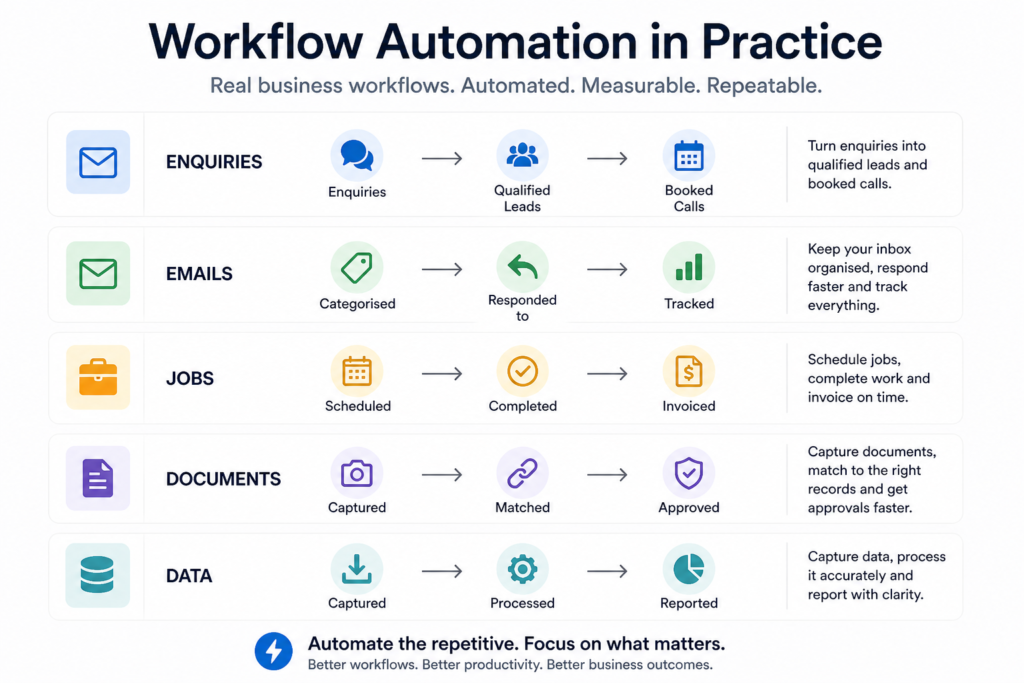
In 2026, this is no longer about cool tech. It’s about removing operational drag. For an Australian SME in the $2 to $10M range, this is often the fastest path to profit improvement, because every hour of admin you remove drops directly to the bottom line.
A clarification I make often: workflow automation does not replace people. It removes the work that shouldn’t exist in the first place. Your team gets to do the work they were actually hired for.
Where Australian SMEs are leaking time
Across Brisbane, the Sunshine Coast, and broader Queensland, the same patterns show up over and over:
- Admin teams manually re-entering data across Xero, the CRM, and a spreadsheet
- Sales enquiries sitting in inboxes for days because no one is the designated owner
- Staff answering the same five customer questions over and over
- Compliance reporting being reconstructed from scratch every quarter
- Customer journeys breaking between tools (form → CRM → email → invoice)
- Job sheets being rekeyed from paper into the system every Friday
These aren’t big problems on their own. They’re high-frequency inefficiencies. Each one costs a couple of hours a week. Stack ten of them across a 30-person business and you’ve lost a full-time role to admin friction.
This is what automation solves best.
The five workflows most Australian SMEs automate first
If you’re looking at workflow automation tools, start here.
Lead capture and follow-up
Most businesses lose leads not because of quality, but because of speed.
The workflow:
- Website enquiry → CRM (Pipedrive, HubSpot, or similar)
- Instant response email or SMS
- Lead tagged, prioritised, and assigned to the right person
- Follow-up sequence triggered automatically
- Stale leads surfaced before they go cold
Typical impact. Faster response times directly increase conversion. Sub-five-minute response on a web enquiry generally outperforms next-day follow-up by a wide margin.
Document intake and matching
This is one of the biggest wins for compliance-heavy businesses such as RTOs, NDIS providers, mining contractors, and trades.
The workflow:
- Documents uploaded by a client, candidate, or contractor
- AI reads and classifies the document
- Content matched against a checklist or framework (RPL, compliance unit, induction requirement)
- Gaps flagged for human review
- Approved items auto-filed in the right place
Typical impact. Document matching that takes a person 30 to 60 minutes per file usually drops to 5 to 10 minutes of review time. The AI does the read; the human approves.
Invoice and payment workflows
Cash flow problems are usually process problems.
The workflow:
- Job marked complete in your job system → invoice generated in Xero or MYOB
- Payment reminders sent automatically on day 7, 14, and 21
- Late payers flagged for a personal call
- Bank reconciliation matched automatically
Typical impact. Faster cash collection (often 5 to 10 days off average days-to-pay), less time chasing, fewer awkward conversations.
Internal task and project handoffs
If work lives in Slack, email, and someone’s memory, it’s already broken.
The workflow:
- Trigger event (signed contract, completed job, client request) → task created in ClickUp, Asana, or Monday
- Assigned to the right person with a deadline
- Status updates flow back to the client or sales rep automatically
Typical impact. Visibility across the business. Nothing falls through the cracks. The founder stops being the bottleneck.
Reporting and decision dashboards
Most reporting is backward-looking and manual.
The workflow:
- Financial and operational data pulled daily from Xero, your CRM, and your job system
- Dashboards updated automatically (Google Looker Studio, Power BI, or a custom dashboard)
- Alerts triggered when key metrics move outside tolerance
Typical impact. Decisions made on real-time data instead of last month’s spreadsheet. Issues caught before they become problems.
Workflow automation tools that work for Australian SMEs
There are hundreds of automation tools. Most are unnecessary. Here’s what I actually see working for $2 to $10M businesses across Australia.
The automation layer (the engine)
This is the tool that connects everything else. Three main options:
Zapier. Easiest to start with. Best for simple, linear workflows. Australian SaaS-friendly. Pricing climbs fast once you exceed a few thousand tasks a month.
Make (formerly Integromat). More flexible than Zapier, visual builder, better value at higher volume. Steeper learning curve but more powerful.
n8n. Open-source, self-hostable, and the most flexible of the three. The right choice when you need custom logic, AI integration, or want to keep data on Australian infrastructure. Almost everything we build at AI Answers runs on n8n.
A quick rule of thumb: under 50 automated tasks a day, Zapier is fine. Above that, Make or n8n usually pays back the setup cost within a quarter.
The application layer (the systems being connected)
The Australian SME stack we see most often:
- CRM: Pipedrive or HubSpot
- Accounting: Xero (most common in Australia) or MYOB
- Job management: ServiceM8, simPRO, or AroFlo for trades; industry-specific systems for everyone else
- Task management: ClickUp, Asana, or Monday
- Communication: Slack or Microsoft Teams
- Forms and intake: Typeform, Tally, or a custom web form
The AI layer
This is where workflows get smarter. The AI sits inside the automation flow and adds judgement.
- AI reading inbound enquiries and classifying them before a human sees them
- AI categorising expenses and flagging anomalies
- AI summarising calls or meetings into structured notes and tasks
- AI answering first-line customer questions via chat or a phone receptionist
- AI matching documents against compliance frameworks
The tools change every few months. The pattern doesn’t. Pick the right model for the task, plug it into the workflow, keep a human in the loop for anything important.
The key is not the tool. It’s how the tools are connected to fit how your business actually works.
What workflow automation costs in Australia (2026)
This is one of the most searched questions in our space, and most agencies hide their pricing. We don’t.
Here are the realistic ranges we see for Australian SMEs in 2026:
| Project type | Typical cost | Build time |
|---|---|---|
| Single small workflow | $1,000 – $5,000 | 1 to 2 weeks |
| Proof of concept build | $3,500 – $8,000 | 2 to 4 weeks |
| Multi-system automation | $15,000 – $35,000 | 4 to 8 weeks |
| Full custom AI workflow or agent | $25,000 – $100,000+ | 8 to 16 weeks |
Ongoing costs (often forgotten): hosting and tool subscriptions ($50 to $500 a month for most SMEs), AI usage credits ($50 to $500 a month depending on volume), and an optional support retainer ($500 to $3,000 a month).
What matters more than the cost is the return.
The simple ROI maths:
- 15 hours a week of admin time recovered, at a fully loaded cost of $40 an hour
- = $600 a week saved
- = $31,200 a year
A $10,000 build paying back in 4 months is typical for a well-scoped first project. Faster cash collection and reduced error rework usually push that payback period in even further.
Want to talk this through?
30 minutes with Andy. No slides, no pressure — just your situation and whether AI actually helps.
Book a free chat with AndyBuild in-house or work with a specialist?
This is the question that holds most SMEs up the longest.
The case for in-house. You own the capability. The person learns your business deeply. No agency markup. Makes sense once you have enough work to keep them busy and the right person to lead them.
The real cost of an in-house AI hire in Australia. A capable AI or automation engineer in Brisbane costs $140,000 to $180,000 a year base, plus super, plus on-costs. Realistically you’re looking at $180,000 to $220,000 fully loaded. Then there’s the management cost (someone has to direct their work), the bench cost (what they do when there’s no project), and the recruitment cost (good ones are scarce in Queensland right now).
The case for a specialist partner. You get the same capability without the overhead. You get exposure to patterns from across other businesses. You scale spend up and down based on actual project work. You don’t carry the recruitment risk.
A working rule of thumb. Below $10M revenue, a specialist partner almost always wins. Between $10M and $50M, a hybrid model often makes sense (one in-house lead, agency capacity behind them). Above $50M, in-house starts to justify itself.
If you’re seriously weighing both, the questions to answer first:
- Do you have at least 12 months of automation work scoped, not just ideas?
- Do you have someone senior who can manage a technical hire?
- Is your stack stable enough that a generalist won’t waste their first 6 months learning it?
- Can you afford the bench time when there’s no project?
- Are you trying to build a product, or trying to run a business better?
The answers usually point clearly one way.
Why most workflow automation projects fail
Not because of the tech. The tech almost always works.
The four reasons we see:
- Trying to automate everything at once. Big-bang projects almost always go over time and over budget. One workflow, properly delivered, then the next.
- Poorly defined workflows. If the manual process is unclear, the automated version will be a mess. Map it on paper first.
- Wrong tool for the job. Zapier doesn’t suit complex logic. n8n is overkill for three steps. Match the tool to the problem.
- No clear ROI. If you can’t articulate what you’ll save in time or dollars, you’ll struggle to defend the project six months in.
The single biggest predictor of a successful automation project isn’t the tool, the budget, or the team. It’s the clarity of the brief.
How to start without getting overwhelmed
The five-step approach we use with every new client:
- Identify one high-value bottleneck. Not the most exciting problem. The most expensive one.
- Map the current workflow on paper. Every step, every handoff, every system involved.
- Design a simple automated version. What can be removed entirely. What can be automated. What still needs a human.
- Build, test, and run in parallel for two weeks. Catch the edge cases before they break production.
- Deploy, document, and move to the next problem.
That’s how automation compounds. One workflow at a time. Each one paying for itself before you start the next.
What this looks like for a 10 to 50 person Queensland business
A typical first engagement with us looks like this:
- 30-minute clarity chat to identify the highest-ROI workflow
- 60 to 90-minute discovery workshop to map it properly
- Scoped quote, timeline, and success metrics
- 2 to 6-week build with weekly check-ins
- Deployment, documentation, and a 30-day support window
Then, if the first one delivers, we move to the second. Most of our long-term clients started with a single $5,000 to $15,000 project and grew from there.
Final thought
Workflow automation isn’t about replacing people. It’s about removing the work that shouldn’t exist in the first place.
For Australian small businesses, especially in competitive markets like Brisbane and the Sunshine Coast, this is increasingly the difference between businesses that scale and businesses that stall.
You don’t need an AI strategy. You need one workflow, properly automated, that pays for itself. Then another.
Want help getting started
At AI Answers, I work with Australian SMEs to build the workflow automation that makes the business actually run.
If you want to identify the highest-ROI workflow in your business and see what it would cost to automate properly, book a free 30-minute clarity chat. No sales pitch. Just clarity on what’s possible.
Or call Andy on 0477 048 850 if you’d rather have a quick conversation first.
Table of Contents
What is workflow automation?
Workflow automation is the process of turning repeatable business tasks into structured, automated systems. Instead of a person manually doing the same job every day, software handles it. A person handles only the exceptions and the decisions. For Australian SMEs, this typically means connecting tools like Pipedrive, Xero, ClickUp, and email so that work flows between them automatically.
How much does workflow automation cost in Australia?
In 2026, a single small workflow runs $1,000 to $5,000. A multi-system automation runs $15,000 to $35,000. A full custom AI workflow or agent runs $25,000 to $100,000+. Ongoing costs include hosting and tool subscriptions ($50 to $500 a month), AI usage credits ($50 to $500 a month), and an optional support retainer ($500 to $3,000 a month).
What workflows should an Australian SME automate first?
The five workflows we see automated first are: lead capture and follow-up, document intake and matching, invoice and payment workflows, internal task and project handoffs, and reporting dashboards. Start with the workflow that’s costing you the most hours per week, not the most exciting one. The most expensive bottleneck is the right place to start.
How long does it take to implement workflow automation?
A single small workflow takes one to two weeks to build. A proof of concept runs two to four weeks. A multi-system automation takes four to eight weeks. A full custom AI workflow or agent takes eight to sixteen weeks. The main variable is not the build time but the clarity of the brief — well-scoped projects ship on time, vague ones don’t.
What’s the difference between Zapier, Make, and n8n?
Zapier is the easiest to start with and best for simple, linear workflows under 50 automated tasks a day. Make (formerly Integromat) is more flexible at higher volume with a visual builder. n8n is open-source and self-hostable, which is the right choice when you need custom logic, AI integration, or want to keep data on Australian infrastructure.
Should a small business hire an in-house AI specialist or work with a specialist agency?
Below $10M revenue, a specialist partner almost always wins because an in-house AI engineer costs $180,000 to $220,000 a year fully loaded, plus management and bench costs. Between $10M and $50M, a hybrid model often makes sense. Above $50M, in-house starts to justify itself. The deciding question is whether you have at least 12 months of automation work scoped, not just ideas.
You’ll know it’s working when the post sidebar shows “FAQ” detected under the Schema tab. Tell me what you see when you scroll to the bottom of the editor and I’ll talk you through whatever’s actually there.